Using Hreflang Tags on Multilingual Sites
A multilingual or multi-regional site holds more than one version of the same content. The search engine has to decide which of those versions to show to which user. The hreflang tag is the technical SEO implementation that defines this relationship.
An incorrect or incomplete implementation produces two outcomes: users land on a page in the wrong language, and versions with similar content cannot be recognised as alternates of one another. This guide covers the decision points and implementation steps required for a correct setup.
What Is the Hreflang Tag?
Hreflang is an HTML attribute that tells search engines which language and region a page is intended for, and at which URLs the other language versions can be found. The tag builds a network of reciprocal relationships between pages.
Its basic structure looks like this:
<link rel=”alternate” hreflang=”en” href=”https://example.com/en/product/” />
<link rel=”alternate” hreflang=”de” href=”https://example.com/de/produkt/” />
<link rel=”alternate” hreflang=”fr” href=”https://example.com/fr/produit/” />
<link rel=”alternate” hreflang=”x-default” href=”https://example.com/en/product/” />
Hreflang is not a ranking signal. It does not lift a page’s position in search results directly; it makes sure the right version reaches the right user. Its effect shows up indirectly, through behavioural metrics such as click-through rate, session duration and conversion.
How Do Language and Region Codes Work?
An hreflang value has two components: a mandatory language code (ISO 639-1) and an optional region code (ISO 3166-1 Alpha-2). The region code cannot be used on its own.
| Value | Meaning | When to Use |
|---|---|---|
| `en` | All English-speaking users | Only one English version exists |
| `en-GB` | English speakers in the United Kingdom | Region-specific content exists |
| `de-DE` / `de-AT` / `de-CH` | German for Germany / Austria / Switzerland | Pricing, regulation or delivery differ |
| `en-US` / `en-GB` | US / UK English | Currency or spelling differs |
| `x-default` | All users with no match | Recommended in every setup |
Formatting rule: lowercase language code, uppercase region code (`en-GB`, `de-DE`). The separator is a hyphen; underscores are not accepted.
Decision rule: if language is the only difference between versions, use the language code alone. Add the region code when pricing, currency, campaigns, legal text or delivery terms differ. An unnecessary regional split creates a structure that is hard to maintain and prone to errors.
What Does x-default Do?
`x-default` specifies the page shown to users who match none of the defined language or region combinations. At homepage level this is usually a language selector or the international homepage; on subpages it is the language-neutral or English version of that specific page.
It is not mandatory, but it is recommended on sites with three or more language versions. Without it, the search engine decides on its own which version to serve to unmatched users.
A common misunderstanding is that `x-default` means the homepage. The value must point to the counterpart of the page the tag set belongs to: in a product page’s tag set, `x-default` should be the international or language-neutral version of that product. Pointing it at the homepage takes the unmatched user away from the content they were looking for and breaks the page-level logic of the hreflang set.
When Should Hreflang Be Used?
Hreflang is not required in every multilingual setup. The decision should follow the nature of the difference between versions.
Cases Where It Should Be Used
- The same content is published as a translation in different languages
- Versions in the same language target different regions (`en-US` / `en-GB`)
- Pricing, currency or delivery terms differ between versions
- Only template elements are translated while the body content stays the same
- Separate domains or subdomains are used for different countries
Cases Where It Is Not Needed
- The site runs in a single language and a single region
- The only difference between versions is visual or design-related
- Content is machine-translated and has not passed editorial review
- Pages are marked `noindex` or blocked in robots.txt
- A canonical relationship exists between versions and one is defined as a copy of the other
Applying hreflang to low-quality translated content does not solve the problem. The tag does not improve how pages with insufficient content quality are assessed.
Hreflang Implementation Methods
There are three methods. The choice should follow the size of the site and its technical infrastructure.
| Method | Best Suited To | Advantage | Watch Out For |
|---|---|---|---|
| HTML head | Sites with a limited number of pages | Directly visible, easy to test | Requires manual management per page |
| XML sitemap | Sites with thousands of URLs | Central management, no HTML overhead | Sitemap freshness and status code tracking |
| HTTP header | PDFs and non-HTML resources | The only option for non-HTML files | Requires server configuration |
1. The HTML Head Method
The tags are placed in the `<head>` section of every page. Each page must list all language versions, including itself.
<head>
<link rel=”alternate” hreflang=”en-US” href=”https://example.com/us/product/” />
<link rel=”alternate” hreflang=”en-GB” href=”https://example.com/uk/product/” />
<link rel=”alternate” hreflang=”de-DE” href=”https://example.com/de/produkt/” />
<link rel=”alternate” hreflang=”x-default” href=”https://example.com/product/” />
</head>
A setup with four values means four tags on every page. As the page count grows, so do HTML size and maintenance cost; for medium and large sites the sitemap method is the better choice.
A live example: Volkswagen Group publishes its corporate site in two languages, German and English, and defines the relationship between them directly in the `<head>` section. The screenshot below is taken from the source code of the English version:

Canonical and hreflang tags on the English version of the Volkswagen Group corporate site.
The example demonstrates three rules at once. First, because language is the only difference between the versions, no region code is used — only `de` and `en` are defined. Second, the English page lists its own URL as well, satisfying the self-referencing rule. Third, the canonical value points to the page’s own URL rather than another language version; this is how hreflang and canonical work together without conflicting.
You can run the same check on any multilingual site yourself: open the page source (Ctrl+U / Cmd+Option+U) and search for `hreflang`. Whether reciprocal references are in place, however, only becomes clear when you compare the source of both language versions side by side; checking a single page hides the most common mistake.
2. The XML Sitemap Method
All language relationships are managed in a single file. It adds no weight to the HTML output and has a markedly lower error rate in large setups.
<url>
<loc>https://example.com/us/product/</loc>
<xhtml:link rel=”alternate” hreflang=”en-US” href=”https://example.com/us/product/”/>
<xhtml:link rel=”alternate” hreflang=”de-DE” href=”https://example.com/de/produkt/”/>
<xhtml:link rel=”alternate” hreflang=”x-default” href=”https://example.com/product/”/>
</url>
The `xhtml` namespace has to be declared on the sitemap’s root element. Every URL listed in the sitemap must return a 200 status code.
A live example: Huawei’s consumer site manages the relationship between dozens of country and language versions through its sitemap. The tag set for a single corporate page (`/about-us/`) contains a separate `xhtml:link` line for each market:
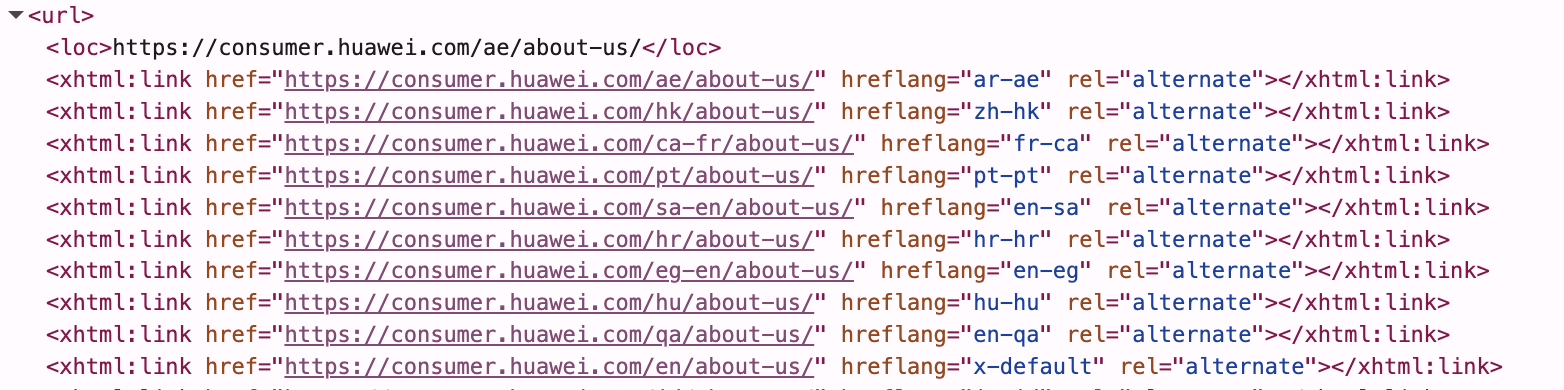
Language and region versions of the same page in the Huawei consumer site’s sitemap file.
The example shows two things at once. First, the same language is split across different markets (`en-sa`, `en-eg`, `en-qa`): the English versions are defined at separate URLs per country. Second, and more importantly, the `x-default` value points not to the homepage but to the English version of the same page (`/en/about-us/`).
You will also notice that the region codes are written in lowercase. The common convention is the `en-SA` form; keeping a single style across the site makes auditing and debugging easier.
3. The HTTP Header Method
This is the only workable method for non-HTML resources such as PDF and DOCX files. The tags are delivered in the server response header.
Link: <https://example.com/en/catalog.pdf>; rel=”alternate”; hreflang=”en-US”,
<https://example.com/de/katalog.pdf>; rel=”alternate”; hreflang=”de-DE”
A Step-by-Step Hreflang Implementation Plan
The six steps below make sure the setup is planned before it is built. Most hreflang errors originate not in the coding stage but in gaps left during planning.
1. Map Your Languages and Markets
Which languages and which markets you will publish in has to be settled before any technical work begins. For each market, define the following:
- Target language and, if required, the region code
- Version-specific content differences (pricing, currency, regulation, delivery)
- Whether the content will be a translation or original production for that market
- The team responsible for keeping the version up to date
Split by region only when there is a genuine content difference. If `en-US`, `en-GB` and `en-AU` carry the same text, a single `en` version is the more sustainable structure.
2. Decide on Your URL Architecture
Hreflang is built on the URL architecture you choose. There are three options, and reversing the decision later is expensive.
| Structure | Example | Advantage | Disadvantage |
|---|---|---|---|
| ccTLD | `example.de` | Strongest country signal, local trust | Separate authority build-up for each domain |
| Subdomain | `de.example.com` | Separate server and infrastructure flexibility | Limited authority sharing |
| Subdirectory | `example.com/de/` | Domain authority is shared, easy to manage | Weaker country targeting signal |
For most setups the subdirectory structure is the most balanced option; domain authority is shared across all language versions and technical management runs on a single infrastructure. The ccTLD structure is worth considering for corporate setups with country-specific brands and operations.
3. Build a Page Mapping Table
Every page’s counterpart in the other languages must be defined in a table. This table is the reference document for the implementation and is used again during verification.
| Page | en-US | en-GB | de-DE |
|---|---|---|---|
| Homepage | `/us/` | `/uk/` | `/de/` |
| Product A | `/us/product-a/` | `/uk/product-a/` | `/de/produkt-a/` |
| Contact | `/us/contact/` | `/uk/contact/` | `/de/kontakt/` |
For pages with no counterpart, the relevant language tag should not be added. Redirecting an unmatched page to the homepage is an incorrect practice.
4. Set Up Reciprocal and Self-References
The hreflang relationship is bidirectional. If page A lists page B as an alternate, page B must list page A in return. Relationships defined in only one direction are ignored by the search engine.
Each page must also list itself (self-referencing). The tag set of the English page must include its own URL with the value `hreflang=”en-US”`. This is the step most often skipped in practice.
5. Define the x-default Page
A default page must be set for users who match none of the defined language and region combinations. This is defined at page level: a language selector or the international homepage for the homepage, and the language-neutral or English version of the same content for subpages. Defining a single x-default value (the homepage, for instance) across all pages is an incorrect setup.
6. Establish a Testing, Release and Monitoring Process
Pre-release verification list:
- All hreflang URLs return a 200 status code
- No URL contains a redirect or a 404
- Tagged pages do not carry `noindex`
- Every page includes a self-reference
- Reciprocal references are complete
- Language and region codes follow ISO standards
Post-release monitoring should continue regularly through Google Search Console and crawling tools.
How Are Canonical and Hreflang Used Together?
The two tags serve different functions and need to be used together:
- Canonical identifies the primary version among duplicate or similar URLs in the same language.
- Hreflang connects alternate versions in different languages to one another.
The rule is clear: every language version must canonicalise to itself. The English page’s canonical value must be its own URL and must not point at the German version.
<link rel=”canonical” href=”https://example.com/us/product/” />
<link rel=”alternate” hreflang=”en-US” href=”https://example.com/us/product/” />
<link rel=”alternate” hreflang=”de-DE” href=”https://example.com/de/produkt/” />
A language version whose canonical value points to another language version is a common mistake that invalidates the hreflang relationship. In that case the search engine does not treat the page as an independent version.
Situations That Need Extra Care
Three scenarios fall outside standard setups and cause the most trouble in projects.
Chinese: zh-Hans and zh-Hant
For Chinese, a script code should be used instead of a region code. `zh-Hans` means Simplified and `zh-Hant` means Traditional Chinese. If a region code is needed, it is added in the form `zh-Hant-TW`. Using `zh` alone makes it impossible to distinguish between the two writing systems.
Multiple Regional Versions of English
Defining versions such as `en-US`, `en-GB` and `en-AU` separately only makes sense when there is a genuine content difference: currency, spelling variations, local regulation or campaign terms. Splitting versions that carry identical text raises management cost with nothing to show for it.
In this structure it is advisable to define `en` as a fallback as well, so that English-speaking regions not listed individually still find a match.
Pages Rendered with JavaScript
If hreflang tags are injected client-side with JavaScript, whether the search engine sees them depends on the rendering stage, which introduces a risk of delay or loss.
Recommendation: hreflang tags should be server-side rendered (SSR) or implemented through the XML sitemap method. The sitemap method is the safest option for JavaScript-based setups.
The Most Common Hreflang Mistakes
| Mistake | Consequence | Fix |
|---|---|---|
| Missing reciprocal reference | The relationship is ignored entirely | Verify that every version lists the others |
| Missing self-reference | The tag set may be treated as invalid | Every page must list its own URL too |
| Incorrect language/region code | The tag is not processed | Check against ISO 639-1 and ISO 3166-1 |
| URL with a 404 or a redirect | That version drops out | All URLs must return 200 |
| Tagging noindex pages | A contradictory signal is created | Tagged pages must be indexable |
| Canonical conflict | The hreflang relationship is invalidated | Every version must canonicalise to itself |
| Forced IP-based redirection | Crawling is blocked | Use a suggestion notice instead of a redirect |
| Using a region code on its own | The tag becomes invalid | A language code must always be present |
| Pointing x-default at the homepage | Unmatched users land on the homepage instead of the page they wanted | x-default must point to the international or language-neutral version of the same page |
How Should Hreflang Be Managed on Large Sites?
On sites with tens of thousands of URLs, hreflang is not sustainable manually. At that scale four practices are recommended:
- Switch to the sitemap method. At this scale the HTML head method increases both page size and error rate.
- Split your sitemaps. Sitemaps separated by language or page type should be collected under a sitemap index file. Diagnosing problems becomes markedly easier in this structure.
- Automate generation. Hreflang tags should be produced automatically from the page mapping table. Manual entry generates errors in direct proportion to the number of pages.
- Set up regular crawls. Periodic checks with crawling tools catch gaps on newly published pages at an early stage.
Hreflang Implementation Checklist
Core checks
- Hreflang values added to all language and region versions
- Every page includes a self-reference
- Reciprocal references are complete
- x-default is defined
Technical checks
- Language codes follow ISO 639-1 and region codes follow ISO 3166-1 Alpha-2
- Language codes written in lowercase, region codes in uppercase
- Every version canonicalises to itself
- Tagged URLs are not blocked by robots.txt or noindex
- All hreflang URLs return a 200 status code
- SSR or the sitemap method used on JavaScript-based setups
Verification
- Search Console International Targeting report reviewed
- Site-wide check completed with a crawling tool
- Tags verified in the browser on sample pages
- Sitemap is current and the sitemap index structure is correctly built
Frequently asked questions
No. Hreflang is not a ranking signal; it makes sure the right language version reaches the right user. Its effect appears indirectly, through behavioural metrics such as click-through rate, session duration and conversion.
It can. However, the search engine will decide on its own which version suits which user. In that case the likelihood of users landing on a page in the wrong language increases.
It is not mandatory, but it is recommended on setups with three or more language versions. Without it, version selection for unmatched users is left to the search engine’s own judgement.
Every language version must canonicalise to itself. A version whose canonical value points to another language version invalidates the hreflang relationship.
No. It should only be added to pages that have more than one language version. No tag should be defined for pages without a counterpart.
Because pages need to be recrawled and reassessed, the effect usually becomes visible within a few weeks. Site size and crawl frequency determine that period.
For most setups the subdirectory structure is more balanced; domain authority is shared across all language versions. Subdomains are worth considering where separate infrastructure is required.
It is not recommended. Forced redirection can prevent search engines from crawling the other language versions. A notification that suggests a version to the user is preferable to a redirect.
Multilingual plugins generate the tags automatically. Reciprocal references, self-references and canonical consistency should still be verified separately after the plugin is set up; automatic generation does not produce complete results in every scenario.
Monthly is enough on sites that publish new pages regularly, and quarterly on static setups. When the site structure changes, the check should be repeated before release.
Set up correctly, hreflang makes a multilingual site appear with the right page in every market. Success depends far more on planning than on technical detail: clarifying the language and market map, choosing the right URL architecture and building a complete page mapping table determine the accuracy of every step that follows.
The process after launch matters as much as the implementation itself. Every newly published page that is not added to the tag set falls outside the relationship network. For that reason hreflang should be treated not as a finished project but as a control step built into the publishing workflow.
 LinkedIn

Keep reading
-
 Content & On-Page SEO
What Is E-E-A-T? Understanding Google’s Content Quality Framework
Content that is technically optimized for SEO, loads quickly, and targets the right search queries may still fall short of its expected visibility in search results. One key reason is that meeting technical criteria alone is not enough; the content must also demonstrate strong signals of experience, expertise, authoritativeness, and trustworthiness. E-E-A-T (Experience, Expertise, Authoritativeness, […]
-
Content & On-Page SEO
What Is Search Intent and How Do You Identify It?
You reached page one for your target keyword, impressions climbed, the graph in the report points up. But visitors bounce back after a few seconds and the form stays empty. More often than not this is not a ranking problem; it is the page offering something other than what the person who typed that query […]
-
Organic Search
What Are Core Web Vitals? LCP, INP, and CLS Metrics
When some URLs are rated “poor” in the Core Web Vitals report in Google Search Console, that is a meaningful signal about the site’s overall performance. Those results, however, cannot always be explained by server infrastructure or page load speed alone. Assessing the various technical factors that shape user experience alongside Google’s measurement method is […]